In the realm of process engineering, Piping and Instrumentation Diagrams (PIDs) serve as critical blueprints that provide vital information about the layout, operation, and control of process systems. Effective communication and clarity in these diagrams are essential for the success of any project. However, traditional methods of viewing and marking up PIDs can be cumbersome and inefficient, leading to potential misinterpretations and lost time.
Try PID Markup for free.
Understanding the Importance of PIDs
PIDs are integral to the design, operation, and maintenance of process plants. They provide a detailed visual representation of the physical and functional relationships between piping, equipment, and instrumentation. Each component on a PID conveys essential information, including specifications, operational parameters, and safety considerations. As a result, accurate and efficient annotation of these diagrams is crucial for effective communication among engineering teams, operators, and maintenance personnel.
The process of marking up PIDs often involves adding notes, highlighting components, and indicating changes or recommendations. Traditional methods of annotation, such as printing out diagrams or using external software, can lead to inefficiencies and errors. PID Markup addresses these issues by offering a dedicated platform for viewing and annotating PIDs in a streamlined manner.
What is PID Markup?
PID Markup is a user-friendly, web-based tool designed specifically for viewing and marking up PIDs. Built on the robust PDF.js framework, it provides an intuitive interface that allows users to efficiently interact with PIDs, adding, managing, and exporting annotations as needed. Key features of PID Markup include:
-
PDF Rendering: PID Markup leverages PDF.js to render PIDs in high quality, ensuring that users can view diagrams clearly and accurately without losing any detail.
-
Annotation Tools: The tool offers a variety of markup options, including highlighting, freehand drawing, text annotations, and shapes. Users can easily indicate changes, add comments, and emphasize critical information directly on the diagrams.
-
User-Friendly Interface: The intuitive layout of PID Markup makes it easy for users to navigate, annotate, and save their work, minimizing the learning curve and enhancing productivity.
-
Navigation Features: Users can easily scroll through pages, zoom in and out, and utilize thumbnail views for quick navigation, making it simple to access specific sections of a PID.
-
Search Functionality: PID Markup includes search capabilities, allowing users to find specific text or components within the PID quickly.
-
Export Options: After completing annotations, users can export the marked-up PIDs in PDF format, preserving all annotations for future reference or sharing with team members.
-
Integration with PlantFCE: PID Markup is seamlessly integrated into the PlantFCE suite, enabling users to leverage annotated PIDs for various cost estimation and project management functions.
Why Choose PID Markup?
PID Markup offers several advantages over traditional methods of PID annotation:
-
Increased Efficiency: With all the necessary tools in one platform, users can quickly mark up PIDs without switching between different applications or software, saving valuable time.
-
Enhanced Collaboration: Teams can collaborate effectively by sharing annotated PIDs, ensuring that everyone is on the same page regarding changes and recommendations.
-
Improved Accuracy: By providing structured annotation tools, PID Markup reduces the risk of errors associated with manual annotation, ensuring that the information captured is accurate and reliable.
-
Flexibility: The tool can be accessed from any modern web browser, allowing users to annotate PIDs from anywhere, whether in the office or on-site.
-
Cost-Effective Solution: As a free tool, PID Markup eliminates the need for costly software licenses while providing robust functionality tailored for PID annotations.
How PID Markup Works
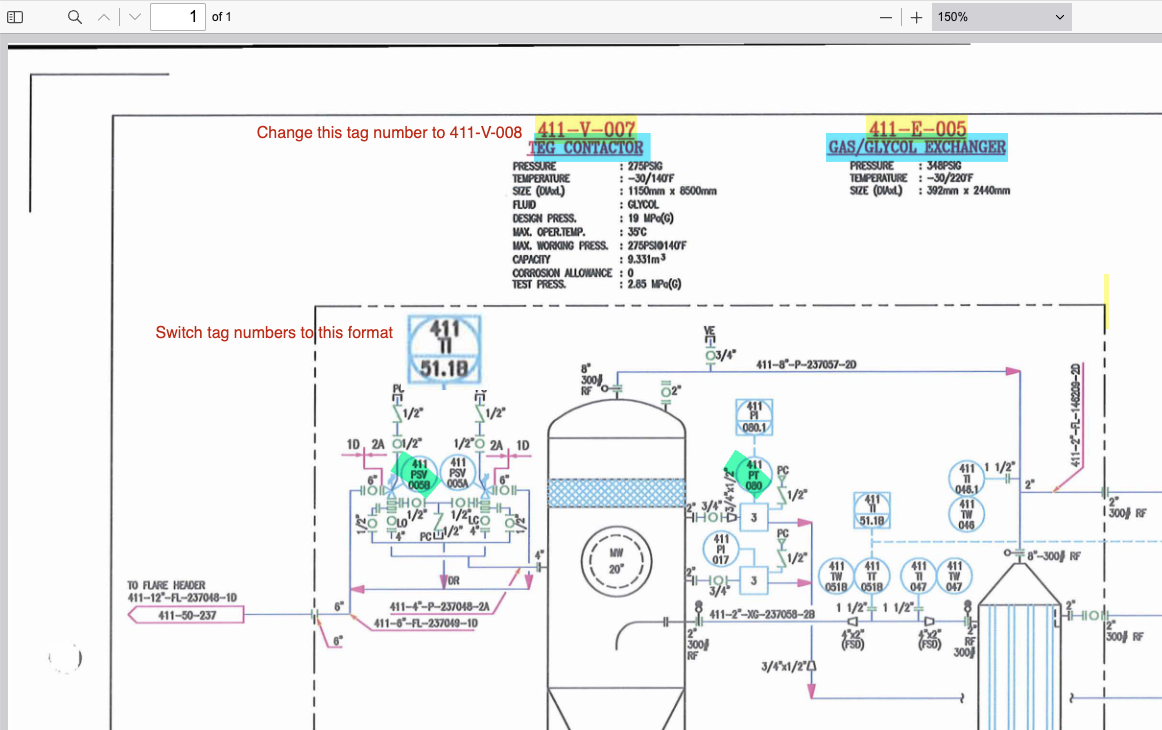
Getting started with PID Markup is straightforward:
-
Accessing the Tool: Users can access PID Markup directly from the PlantFCE website. The tool is available for free, making it accessible to all professionals in the process engineering field.
-
Uploading PIDs: Users can easily upload PIDs in PDF format. The tool supports high-resolution PDFs to ensure clarity during annotation.
-
Annotating Diagrams: Once the PID is uploaded, users can utilize the annotation tools to highlight components, add comments, and draw shapes directly on the diagram. This allows for clear communication of ideas and suggestions.
-
Saving and Exporting: After completing the annotations, users can save their work and export the marked-up PID in PDF format. This ensures that all annotations are preserved for future reference or collaboration.
-
Integration with PlantFCE: Annotated PIDs can be integrated into the broader PlantFCE suite, enhancing project management, cost estimation, and documentation processes.
Try PID Markup for free.
The Role of PlantFCE in Cost Estimation
PlantFCE is a comprehensive suite of tools designed to optimize the cost estimation process for process plants. It encompasses various functionalities, including:
-
Document Parsing: Automatically extracting relevant information from documents to facilitate quick and accurate cost estimation.
-
Basic Modeling: Creating simplified models of processes to help visualize costs and resource allocation.
-
Auto Routing: Streamlining the routing of materials and resources within a project to minimize delays and inefficiencies.
-
Material Take-Off (MTO): Generating lists of materials required for a project, ensuring accurate budgeting and procurement.
-
Requisition and Cost Basis: Using public and private data sources to establish a reliable cost basis for projects, enhancing decision-making.
-
Automated Workflows and Audit Trails: Maintaining consistency and accountability through automated workflows that track changes and decisions throughout the project lifecycle.
The integration of PID Markup within the PlantFCE ecosystem enriches this suite of tools, allowing users to annotate PIDs and leverage that information for various applications, including cost estimation and project management.
Future Development and Community Engagement
PID Markup represents a significant step forward in enhancing the way professionals interact with PIDs. As an open-source tool, we encourage users to engage with the PID Markup community by providing feedback, sharing use cases, and suggesting enhancements. Future developments may include:
-
Enhanced Annotation Features: Introducing additional tools for more advanced markup options, such as arrows and callouts, to improve clarity in communication.
-
Real-Time Collaboration: Implementing features that allow multiple users to annotate a PID simultaneously, facilitating teamwork and collaboration.
-
Mobile Accessibility: Developing a mobile-friendly version of PID Markup to enable users to annotate PIDs on-the-go.
-
Integration with Machine Learning: Exploring the potential for machine learning algorithms to assist in auto-suggesting annotations based on historical data.
Conclusion
PID Markup is poised to transform the way professionals annotate and interact with PIDs, making the process more efficient, accurate, and user-friendly. By leveraging this powerful tool within the PlantFCE ecosystem, users can streamline their workflows and enhance their cost estimation processes.
We invite you to explore PID Markup on the PlantFCE website, take advantage of its features, and join us in shaping the future of PID annotation. Together, we can elevate the standards of documentation and project management in the process engineering industry.
Stay tuned for updates and new features as we continue to develop PID Markup into an indispensable tool for all your PID annotation needs!